If you’re unsure where to start with SEO, or you’re feeling daunted by the prospect of it, then we’re here to break it down for you and give you simple, actionable steps you can take to help your website appear in Google search.
SEO can feel like a bit of a technical minefield, but the basics of it are much simpler than you might think.
SEO stands for ‘Search Engine Optimisation’. All this really means is giving your website the best chance at showing up in search engines so that people can find you. When we say ‘on-page SEO’ we’re talking about things you can easily apply to your web pages without getting too technical.
We’ll walk you through the fundamentals below, giving you 9 simple steps to follow to make sure each page follows SEO best practices.
1 - Find the right keywords
Keywords are the words or phrases that people use in search engines to find what they want. These can be things like ‘coffee shops Kirkwall’ and ‘holiday cottage Orkney’. Think about the different ways you could describe your business and what you do, and also how you would search on Google for something similar.
There are lots of free tools you can use to find keywords. These will tell you important details like:
The average number of searches per month
The search intent (whether users are looking for information, or to buy and compare products or services)
Keyword difficulty (how competitive it might be to try and rank for a particular keyword)
The sweet spot is finding a keyword with relevant search intent with an ‘easy’ difficulty rating.
2 - Use your keywords in your content
Now that you’ve got your keywords, it’s time to use them! It’s important to incorporate them naturally within your content and not to overuse them (which is known as ‘keyword stuffing’).
The page heading and the first paragraph of text are the most important places to include your main keyword and you can include other relevant secondary keywords throughout the text too, where it makes sense to.
Focus on sounding natural, and if in doubt, read it out loud to yourself. Does it make sense? If not, have another go. Focus on readability over including extra keywords.
3 - Create a good title tag
Your title tag describes what your page is about, and it helps Google to categorise it. This is what shows up in search results when you google something. For example, see the below example which showed up in a google search for ‘boat tours Orkney’:
Here you can see Experience Orkney’s landing page. Their title tag is ‘Orkney Boat Tours & Charter Trips’. It’s a functional title which tells us what they do, and helps Google to match them to the keyword ‘boat tours Orkney.’
Your title tag should be under 60 characters (otherwise it’ll get cut off). There are loads of free tools you can use to check how they’ll show up, like this title tag preview tool from Moz.
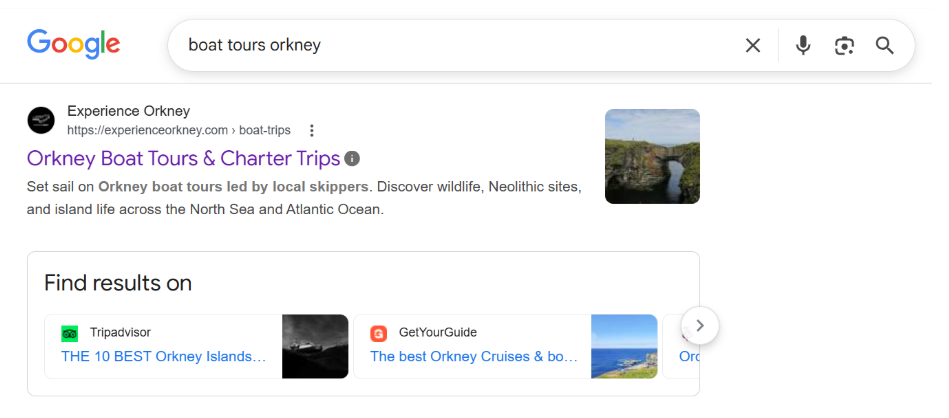
A screenshot of a web search for Boat tours Orkney
4 - Write a good meta description
Your meta description is the slightly longer description that sits underneath the title tag. If we look at the Experience Orkney example again, you’ll see it in the image below:
As you can see, it’s still pretty short but it gives more detail on what people might get from the experience. Think of it like a mini sales pitch; it should work to entice users to click on your page and communicate what you have to offer.
The ideal length for your meta description is 120-160 characters, so be concise and focus on the most important details. It’s about helping people to understand at a glance what you’re offering and what your webpage is about.
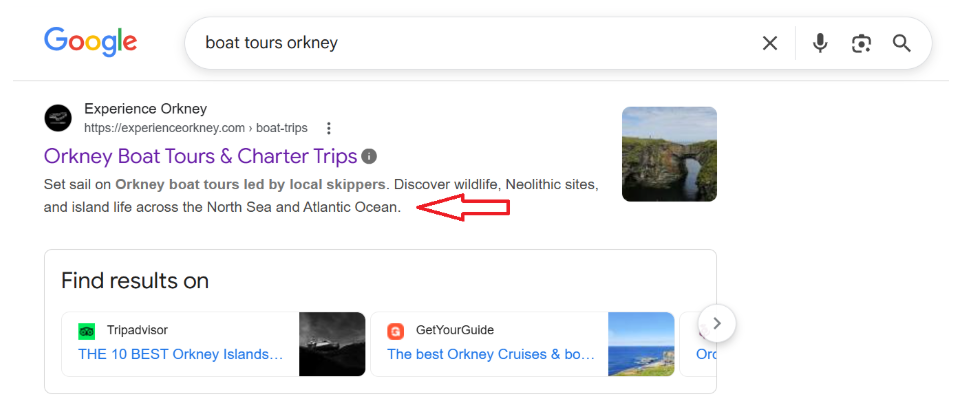
Screenshot of a web search with the meta description being pointed to
5 - Focus on good quality content
A fundamental part of good SEO is quality content. Even if you target the right keywords and put everything in the right place, without good content you’ll struggle to rank. To create good quality content think about:
Using natural language that’s easy to understand
Put the most important information at the top
Structure – break up long paragraphs with sub headings, lists, bullet points and imagery
Include original or high quality images
Make sure it’s relevant to your brand and audience
These elements will vary depending on the nature of your page (whether it’s a product listing, service page, sales page, etc.) but making it as good as it can be gives you the best chance at appearing at the top of Google’s search results.
6 - Use heading tags
When you’re formatting your page content inside your content management system (for example, WordPress, Squarespace etc), you’ll see options for selecting H1, H2, H3… heading tags. These tell search engines what the structure of your page is, and helps them to understand which sections are the most important.
Your title should always be H1, and there should only be one of those per page. Section headings should be tagged as H2 (for example, the heading above ‘use heading tags’ is an H2) and then any subheadings or sections within that should be H3, and so on…
7 - Check your URL slug
Perhaps not the most appealing name, but the ‘slug’ is the technical term for the wording of your URL. It’s the wording that comes after the forward slash (/) part of the URL, which you can usually customise before you publish it.
For example, the slug for looks like this:

The highlighted part of this URL is the Slug
Ideally, you want the slug to communicate what the page is about in as few words as possible. Some top tips include:
Include the main keyword – If your page is targeting ‘custom flower bouquets’ then this could work well as your slug
Avoid unnecessary words (like ‘and’ or ‘but’) – A blog titled ‘The Fundamentals of Good On-Page SEO’ becomes ‘on-page-seo-fundamentals’
Be concise – Avoid including too many descriptive terms, focus on the most basic description of your page
8 - Add internal links to relevant pages
Use hyperlinks in the text to navigate to other related pages on your website. This helps search engines to understand the structure of your website, making it easier for them to surface your pages in search results.
It also adds another way for visitors to navigate to relevant pages on your site, so they can find the information they need.
When adding internal links, think about:
Your anchor text. This is the word, or phrase, that you’re linking from. It should describe the page it’s linking to.
Including them naturally within the text, and only where relevant.
Using them sparingly – don’t overwhelm users with loads of links, only include the most relevant ones
Linking to your most important pages. Where do you want users to navigate to next?
9 - Add alt text to imagery
For each image you upload and include in your page, you’ll see a section for adding alt text, or an image description. This is important for screen readers, to make the content accessible for everyone. It will also show up if the image itself won’t load.
Another benefit to alt text is that it helps Google to ‘read’ and categorise your images so they can appear in search results, giving your site additional chances to be found.
Alt text should be a literal description of the image. Keep it short and concise, and make it simple to understand.
Need more help?
Hopefully you’re now feeling more confident about making your web pages SEO friendly. Optimising for search engines doesn’t have to be complicated, as long as the fundamentals are there you’ve got a great starting point for improving your visibility.
If you’re stuck on where to start, or you don’t have the time to spend on SEO, get in touch to find out how we can help you. Or check out our services page for our marketing support packages.
